Showing posts with label Walloid. Show all posts

Wednesday, August 15, 2012

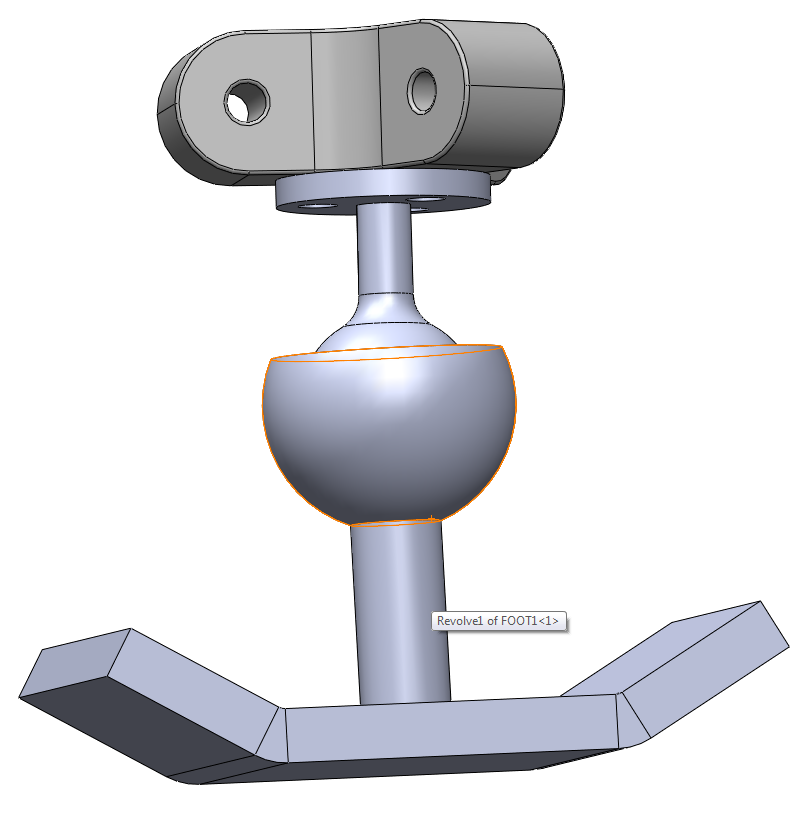
Walloid from CAD design to being built ...

Walloid Design


Walloid, per today built in Aluminium and ABS Plastic printed by 3D printer

Wednesday, January 25, 2012

Thursday, September 8, 2011

Thesis progress

The numbers on the right side are numbers of pages while the numbers in the bottom are the dates.

Friday, September 2, 2011

Thread programming is a key element

Thread programming in writing high speed stream of data is a key point in navigation systems. Effective DAQ system is critical in such systems and the idea of synchronization between different threads and the communication channels between different threads are also very important. More about this later ...

Tuesday, August 23, 2011

Engineers facing the world ...

Engineers believe they can fix everything and in case of failure, they are humble enough to accept carry the guilt personally and mention that it is them who can not solve the challenge, but a challenge always has a solution :-)

I like to be an engineer ;-)

Thursday, August 11, 2011

Monday, August 8, 2011

Nice quote ...

To solve any problem, here are three questions to ask yourself: 
- First, what could I do? - Second, what could I read? - And third, who could I ask?
- Jim Rohn

Friday, August 5, 2011

Climbing patterns

Fast climbing with degrees from 0 - 360 degrees

Slow climbing with either upwards and downwards, or right and left

The combination of these two types of climbing can give a combination of very fast climbing plus precise climbing when needed. Also fast climbing method gives robot the chance to move to directions from 0 - 360 degrees.

Bluetooth Technology

Bluetooth uses very little energy !!! They are used in Tsunami detectors (ZIGBEE tech) ...

Advantages
Disadvantages
High throughput
Device discovery is slow in term of power usage and time
Resilience against interference
Keeping connections open is expensive in term of power usage
????????
??????????

Thursday, August 4, 2011

Infrared Technology

Using Infrared for connecting micro-controllers is one of the available choices of wireless intercommunication between micro-controllers. Here is a short list of challenges and the benefits that using such technology would provide us :
Advantages
  • Very low power requirement, hence it is best suitable for machinery with limited battery capacity, like mobile robots, laptops, pads, phones, etc.
  • Inexpensive -> Not a very important issue in designing a revolutionary system. The redundancy is the most important feature.
  • Very secure. The data flow among the source and target is unidirectional, meaning the direction of the infrared beam ensures that there in no leaked or move to nearby devices as it’s transmitted. 
Disadvantages 
  • Data transmission happens in eye sight. -> Meaning you can not have it in a big robot.
  • Short range communication -> Actually this is an advantage in our case, which brings more security.
  • Easily gets interrupted by obstacle  -> Meaning you can not have it in a robot with several layers between micro-controllers. Almost any kind of obstacle interrupt the signal.
  • Not a good choice under extreme weather conditions(sunlight, rain, pollution etc) -> This is the most negative point for this technology not be used in an offshore robot.
Depending on the area of application Infrared might be or might not be the right choice. E.g. the short range of availability would increase our security a lot, while exactly in Walloid project the harsh weather condition is very common in future platforms. Today, there are many technologies exists that are much better than IR like Bluetooth, Wi-Fi etc.

Tuesday, August 2, 2011

Sunday, July 24, 2011

It is all about making a SYSTEM !!!

After visiting the Mercedes Benz factory in Bremen, and reading some articles/research papers form integrated operation in offshore world, I think the solution is all about System ... A system that can put both human controllers and robots in one system.

Tuesday, May 10, 2011

The tolerance issue in 3D printing

These broken parts are gonna delay my work ...

The conjunction between the motor led and the robot body
The broken conjunction on robot body side
The broken conjunction on Motor side
 Totally new printed encoder parts were received on 9th of May 2011, and one of them(picture below) was broken into two pieces while being mounted on the same day
The old broken encoder part(black one) beside the new one that was broken under mounting

Thursday, May 5, 2011

Finally OpenCV 2.1 & MS VC++ 2008 worked together ...

This is OpenCV helloWord program which is an easy code that just opens one picture. Too sleepy to continue today ... OpenCV 2.2 is too much unstable and I couldn't get to make it work with MS VC++ 2010. Downgrade worked :-)

Good night

Thursday, April 28, 2011

I2C

I2C inter micro controller communication

First experiment, failed !!! The problem : Grounds were not connected together !!!

Second experiment, Succeeded :-)

I2C connection between one master Arduino & one Slave Arduino over a serial clock pin (SCL, pin number 4 in the picture down here, YELLOW wire) that the Arduino pulses at a regular interval, and a serial data pin (SDA, Pin number 5 in the picture down here, RED wire) over which data is sent between the two devices. Also make sure that the grounds are connected together.


Master Writer Code - Program for Arduino 1

// Wire Master Writer
// by Nicholas Zambetti 

// Demonstrates use of the Wire library
// Writes data to an I2C/TWI slave device
// Refer to the "Wire Slave Receiver" example for use with this

// Created 29 March 2006

// This example code is in the public domain.


#include 

void setup()
{
  Wire.begin(); // join i2c bus (address optional for master)
}

byte x = 0;

void loop()
{
  Wire.beginTransmission(4); // transmit to device #4
  Wire.send("x is ");        // sends five bytes
  Wire.send(x);              // sends one byte  
  Wire.endTransmission();    // stop transmitting

  x++;
  delay(500);
}


Slave Receiver Code - Program for Arduino 2


// Wire Slave Receiver
// by Nicholas Zambetti 

// Demonstrates use of the Wire library
// Receives data as an I2C/TWI slave device
// Refer to the "Wire Master Writer" example for use with this

// Created 29 March 2006

// This example code is in the public domain.


#include 

void setup()
{
  Wire.begin(4);                // join i2c bus with address #4
  Wire.onReceive(receiveEvent); // register event
  Serial.begin(9600);           // start serial for output
}

void loop()
{
  delay(100);
}

// function that executes whenever data is received from master
// this function is registered as an event, see setup()
void receiveEvent(int howMany)
{
  while(1 < Wire.available()) // loop through all but the last
  {
    char c = Wire.receive(); // receive byte as a character
    Serial.print(c);         // print the character
  }
  int x = Wire.receive();    // receive byte as an integer
  Serial.println(x);         // print the integer
}


Source : http://arduino.cc/en/Tutorial/MasterWriter

Friday, March 18, 2011

New calculations for positioning

Update : 06:01, 18.03.201, I am almost done with the C code on Arduino ... Too sleepy, going back home now ...
I should write a program that can simulate the workspace as I have no idea what are the valid points on workspace that are reachable by the feet.
----------------------
New calculations for positioning, the whole thing could not be easier than this ...