Showing posts with label Serial Communication. Show all posts

Thursday, April 28, 2011

I2C

I2C inter micro controller communication

First experiment, failed !!! The problem : Grounds were not connected together !!!

Second experiment, Succeeded :-)

I2C connection between one master Arduino & one Slave Arduino over a serial clock pin (SCL, pin number 4 in the picture down here, YELLOW wire) that the Arduino pulses at a regular interval, and a serial data pin (SDA, Pin number 5 in the picture down here, RED wire) over which data is sent between the two devices. Also make sure that the grounds are connected together.


Master Writer Code - Program for Arduino 1

// Wire Master Writer
// by Nicholas Zambetti 

// Demonstrates use of the Wire library
// Writes data to an I2C/TWI slave device
// Refer to the "Wire Slave Receiver" example for use with this

// Created 29 March 2006

// This example code is in the public domain.


#include 

void setup()
{
  Wire.begin(); // join i2c bus (address optional for master)
}

byte x = 0;

void loop()
{
  Wire.beginTransmission(4); // transmit to device #4
  Wire.send("x is ");        // sends five bytes
  Wire.send(x);              // sends one byte  
  Wire.endTransmission();    // stop transmitting

  x++;
  delay(500);
}


Slave Receiver Code - Program for Arduino 2


// Wire Slave Receiver
// by Nicholas Zambetti 

// Demonstrates use of the Wire library
// Receives data as an I2C/TWI slave device
// Refer to the "Wire Master Writer" example for use with this

// Created 29 March 2006

// This example code is in the public domain.


#include 

void setup()
{
  Wire.begin(4);                // join i2c bus with address #4
  Wire.onReceive(receiveEvent); // register event
  Serial.begin(9600);           // start serial for output
}

void loop()
{
  delay(100);
}

// function that executes whenever data is received from master
// this function is registered as an event, see setup()
void receiveEvent(int howMany)
{
  while(1 < Wire.available()) // loop through all but the last
  {
    char c = Wire.receive(); // receive byte as a character
    Serial.print(c);         // print the character
  }
  int x = Wire.receive();    // receive byte as an integer
  Serial.println(x);         // print the integer
}


Source : http://arduino.cc/en/Tutorial/MasterWriter

Wednesday, March 9, 2011

My status on the 6th day of my holidays that I use for working on my thesis

  • Counter code fixed in Arduino C code
  • Problems with wrong usage of RxTxLibrary(mis match which wasted enough of my time during 6 days ago; unstable connection from Arduino to Java Control System)
  • Java Simulator works fine, just need to finish the fancy java demonstration
  • Logging system works very good
  • Help through HTML file, online
  • Java & Arduino are communicating perfectly
  • Some problems with the prototype feet I have as just one motor functions
  • Working on positioning & zero positioning
  • Safety system for preventing the motor to crash backwards or too much forward

Prevention of motor crash in C, offline Robot


Prevention of motor crash in Java, online Robot, Simulation & Real world


Wednesday, January 12, 2011

Meeting with my supervisor Mats Høvin, Summary

Today I met my supervisor Mats Høvin(associated professor at IFI,UiO). Here comes a summary of what he thinks I should be focusing on :

  • Handshake protocol. I do not have this protocol & this is something that according to Mats, I better have it implemented in my code
  • Zero Positioning. My suggestion to this challenge is to save the current position all the time either at PC side or at the Arduino non-volatile memory.
  • Sending data packages back & forth in serial communication would possibly result in loss of data packages. How can my code handle this kind of problems ?
  • Error on startup, fix for it ? Is it a programming error, or a hardware error because of Noise on reading inputs from ports ???
  • Sending many bytes and the delays resulting by that
  • The speed control, should be handled in java or Arduino ??? Maybe fast in the beginning and slow down little by little while reaching the end of the axle
  • Play off modus & Should it be target based, or follow every detail from the log blindly ??? Discuss ...
  • Camera candidates & streaming , but not image processing -> Intelligent cameras with output ports(how many???) for sending commands to Arduino according to the image processing done by camera itself.
  • Using WiFi tech & how ??? WiFly component ?
  • Programing a simulator in JAVA (xyz generation and visualization in JAVA)
  • PHP/JAVA Applet GUI & Streaming show on website
  • Multi Arduino card solutions ? Benefits and disadvantages ??? Discuss ...
  • FPGA??? A possible solution instead of Arduino? Discuss ...
  • Different methods to read data from encoders, External interruptions or software methods reading encoders value by analogRead() on loop frequence. Discuss based on Atmel/AVR architecture
  • Positioning in the room & semi-Kinect sensors

Friday, January 7, 2011

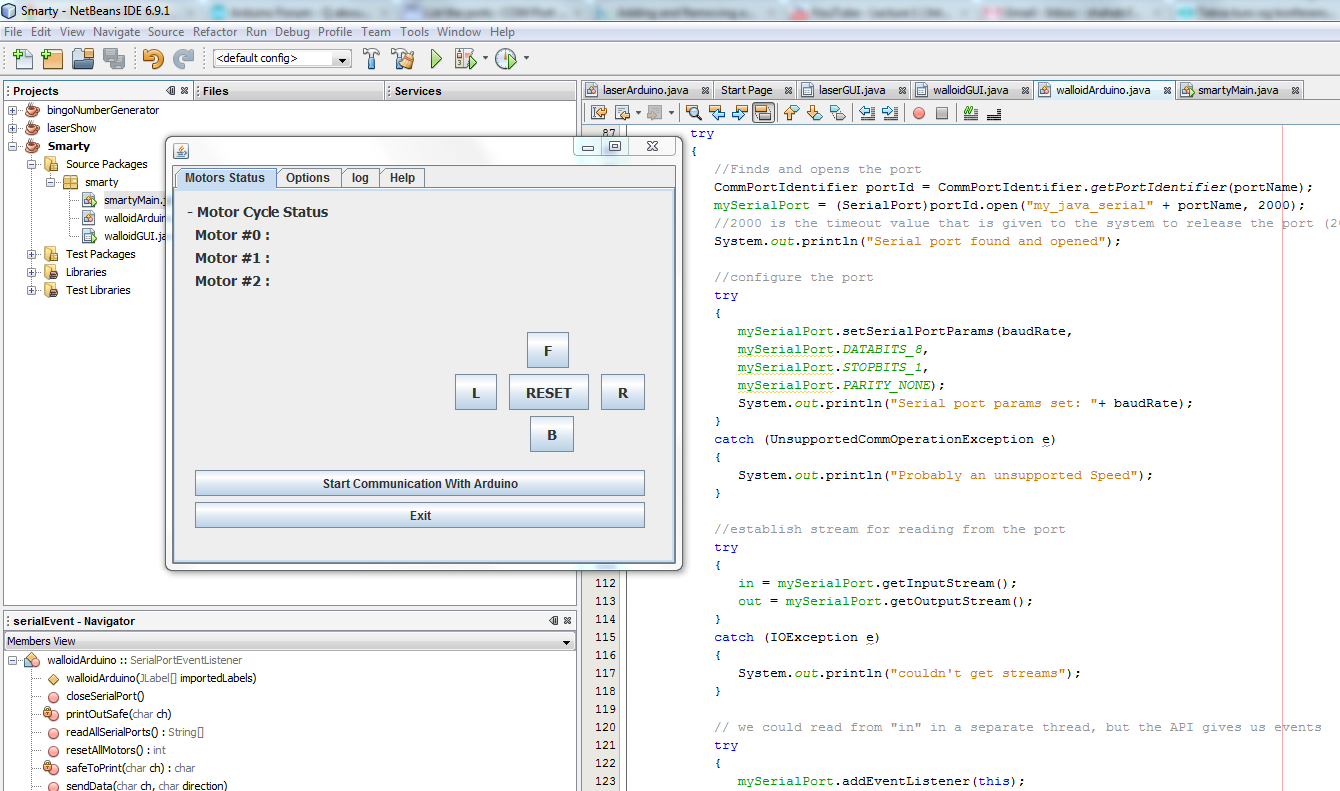
Robot foot Control Panel(in Java) for the robot feet, version 0.01

This is the first snapshot of a GUI for the Robot foot Control Panel in Java that I am designing right now. I do not have much trouble with it and it looks promissing :-) Updates of the code and more snapshots come soon ...

Serial data transmission and problem with it being SLOW !!!

A while ago I was facing a problem reading some inputs from Serial Communication(USB port) in Arduino. The Arduino would work perfect(read all the inputs from Serial Communication Window as planned) if I was having my debug print outs but not if I would remove them(they also could be substituted by Delays) !!! I later tried to find out about them and here was the answer :
"Serial data transmission is slow. The Serial.print statement takes time, which allows time for more data to arrive. You have two choices. Add a delay statement to the while loop, and hope all the data arrives in time is the first choice. The longer you waste time waiting for data, the better your chances of it all arriving in time.
The second choice is to add an end-of-packet marker, and keep appending to temp until that end of packet marker arrives. Only use the data in temp when the end of packet marker has arrived.

The delay masks the issue of not being able to read a complete packet in one pass. If the delay is too small, the whole packet will not arrive before the delay(s) expire. If the delay is too large, you are just wasting time.

The better approach is to add an end of packet marker to the packer, wo you can read the packet as quickly as possible.."
Source : http://www.arduino.cc/cgi-bin/yabb2/YaBB.pl?num=1294185714/1#1

RxTx API, Java

By clicking on the following link you can have access to the full directory of RxTx library API's in Java :